 |
| view binding by https://www.codeblogs.info/ |
What is Android View Binding and How to simplify its delegation?
Use view binding to replace findViewById?
What is View Binding?
As said on their developer’s page,
View binding is a feature that allows you to more easily write code that interacts with views. Once view binding is enabled in a module, it generates a binding class for each XML layout file present in that module. An instance of a binding class contains direct references to all views that have an ID in the corresponding layout.
- In most cases, view binding replaces
findViewById.
Why do we need it?
When we use findViewById , we need to declare the view variable for x times we need to use it. It makes a lot of boilerplate code inside your view Activity/Fragment. That is why View Binding came to provide a good way to access all views with only initializing one variable.
When we use findViewById , we need to declare the view variable for x times we need to use it. It makes a lot of boilerplate code inside your view Activity/Fragment. That is why View Binding came to provide a good way to access all views with only initializing one variable.
TL;DR
- Enable view binding in
build.gradle (no libraries dependencies) - View binding generates a binding object for every layout in your module (
activity_awesome.xml → ActivityAwesomeBinding.java) - Binding object contains one property for every view with an id in the layout — with the correct type and null-safety
- Full support for both the Java programming language and Kotlin
- Enable view binding in
build.gradle(no libraries dependencies) - View binding generates a binding object for every layout in your module (
activity_awesome.xml→ActivityAwesomeBinding.java) - Binding object contains one property for every view with an id in the layout — with the correct type and null-safety
- Full support for both the Java programming language and Kotlin
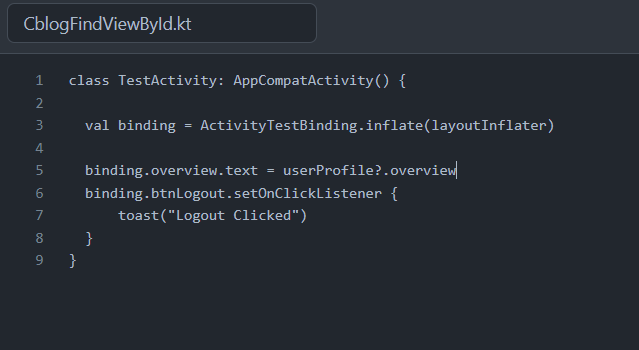
Like:
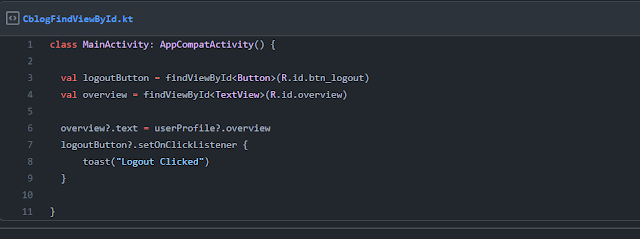
And this is updated how we use the view binding
Update build.gradle to enable view binding
You don’t need to include any extra libraries to enable view binding. It’s built into the Android Gradle Plugin starting with the versions shipped in Android Studio 3.6. To enable view binding, configure viewBinding in your module-level build.gradle file.
// Available in Android Gradle Plugin 3.6.0 or below of 4.0
android {
viewBinding {
enabled = true
}
}
In Android Studio 4.0 or above (viewBinding) has been moved into buildFeatures So now this is use as -->
// Android Studio 4.++
android {
buildFeatures {
viewBinding = true
}
}
Note: View binding works with your existing XML, and will generate a binding object for each layout in a module

viewBinding in your module-level build.gradle file.android {
viewBinding {
enabled = true
}
}
(viewBinding) has been moved into buildFeatures So now this is use as -->android {
buildFeatures {
viewBinding = true
}
}


0 Comments